



The result of childcare marketing isn't limited to enrollment.
Childcare marketing is a way to build trust and a relationship with parents before they walk through your doors.
Look at it from the parents' perspective:
First-time parents or young parents are bombarded with information and plagued with choices. Different teaching methods, curriculum, teaching philosophies.
It's overwhelming.
Add to that the trust factor.
A person buying a phone may trust Apple or Samsung because they already know the brand. A parent choosing childcare faces a much bigger decision. They are choosing who will care for their toddler, manage difficult moments, and shape part of their early development.
That level of trust takes more than one ad or one tour. And that isn't built with one recommendation from a friend or one ad on Facebook.
It is built with the right processes and systems in place.
This blog covers the importance of childcare and how to build a process workflow around it, without adding too much burden on your staff
Note: this guide walks through the channel-by-channel tactics. If you're an owner deciding how much budget to allocate, which channels to prioritize, and who should own the work, see our childcare marketing strategy guide for owners.
Why is it important to market a childcare center?
Childcare marketing is seen as a cost when it is an investment that snowballs
Most childcare leaders take one of two paths.
First, they treat families well, rely on word of mouth, and hope those families recommend the center.
Second, they wait until seats are empty. Then they launch a few urgent marketing campaigns that are often too little, too late.
But word of mouth is not a plan. At best, it is a prayer.
It depends on who your current families know, when childcare comes up in conversation, and whether the other parent needs care at that moment. You cannot increase it on demand when three infant seats open in February.
Relying on referrals alone means giving up the chance to build a predictable pipeline. It is one reason centers see bursts of inquiries followed by long periods of empty seats.
Even when centers invest in marketing, they often do it as a last-minute response to a vacancy. By then, they need immediate results from a pipeline that should have been built months earlier.
That approach is even riskier today. With falling birth rates, an increase in home schooling trends, and free pre-K alternatives, you have tough competition in a shrinking market.
If your center is not reaching future families before they need care, another provider will.
What Are the Main Types of Childcare Marketing?
We like to look at childcare marketing in two broad parts: offline and online. Both have different uses, but they support the same goal.
Offline Childcare Marketing
Offline marketing refers to the ways your center builds awareness through local relationships, in-person events, community spaces, and direct recommendations.
It works because childcare is local. Most families want a center near their home, workplace, or daily commute. This makes the community around your center one of your most valuable marketing channels.
1. Host Enrollment Events That Give Families a Reason to Visit
An enrollment event should not feel like a long sales presentation. It should give families a useful reason to enter your center and experience the program.
If this sounds like a large investment for an experiment, start with a low-cost format. You do not need outside speakers, expensive decorations, or a large catering budget.
Use resources you already have:
- Ask educators to lead talks or activities. These could include a kindergarten-readiness Q&A, a session on separation anxiety, a story hour, or a meet-the-teachers evening.
- Reuse classroom materials or partner with a local business that can contribute supplies.
- Host the event during an existing family activity, such as an open classroom morning.
- Offer coffee and simple snacks instead of a full meal.
- Limit attendance through registration.
- Invite current families to bring a friend.
The best event connects directly to something your center does well.
For example, a nature-based center could host a Saturday gardening activity. A bilingual program could run a short music and storytelling session in both languages. A center known for school readiness could hold a parent workshop on preparing children for kindergarten.
This helps families experience your differentiator instead of only hearing about it.
{ Pro tip:
- Start with one event every quarter.
- Collect contact details during registration.
- Offer tours at the end.
- Follow up within one business day.
- Track registrations, attendance, tours, and later enrollments.
If a certain format works well, repeat it more often. The event creates awareness. The follow-up turns that attention into an enrollment opportunity. }
2. Build a Referral Program Parents Will Actually Use
Referrals work because trust moves from one family to another. However, a referral program needs a clear process. It cannot depend on parents remembering to mention your center.
Start by deciding:
- When is the reward earned?
For example: Refer a new family and receive a $100 tuition credit after their child completes their first month.
The waiting period protects the center from giving rewards for incomplete or short-lived enrollments.
- Will both families receive a benefit?
You could offer a credit to the referring family and waive a small registration fee for the new family.
- How will the referral be tracked?
Your childcare billing software can apply the credit consistently. It can also show which families made referrals and which accounts received the benefit.
The incentive should be meaningful but easy to manage. Avoid complex point systems that create more work than they generate.
{ Pro tip: A referral request works best when it follows a good experience.
Promote the program during moments when parents already feel positive about the center, such as:
- following a positive progress meeting;
- after a family event;
- after a child settles in successfully;
- when a parent praises a teacher;
- during re-enrollment. }
3. Build Partnerships With Organizations Families Already Trust
The goal is not to leave flyers everywhere. A strong partnership should create value for both sides.
When assessing a partnership, ask:
- Do we serve similar families?
- Can we create something useful together?
- Will both sides promote it?
- Can we track the inquiries it produces?
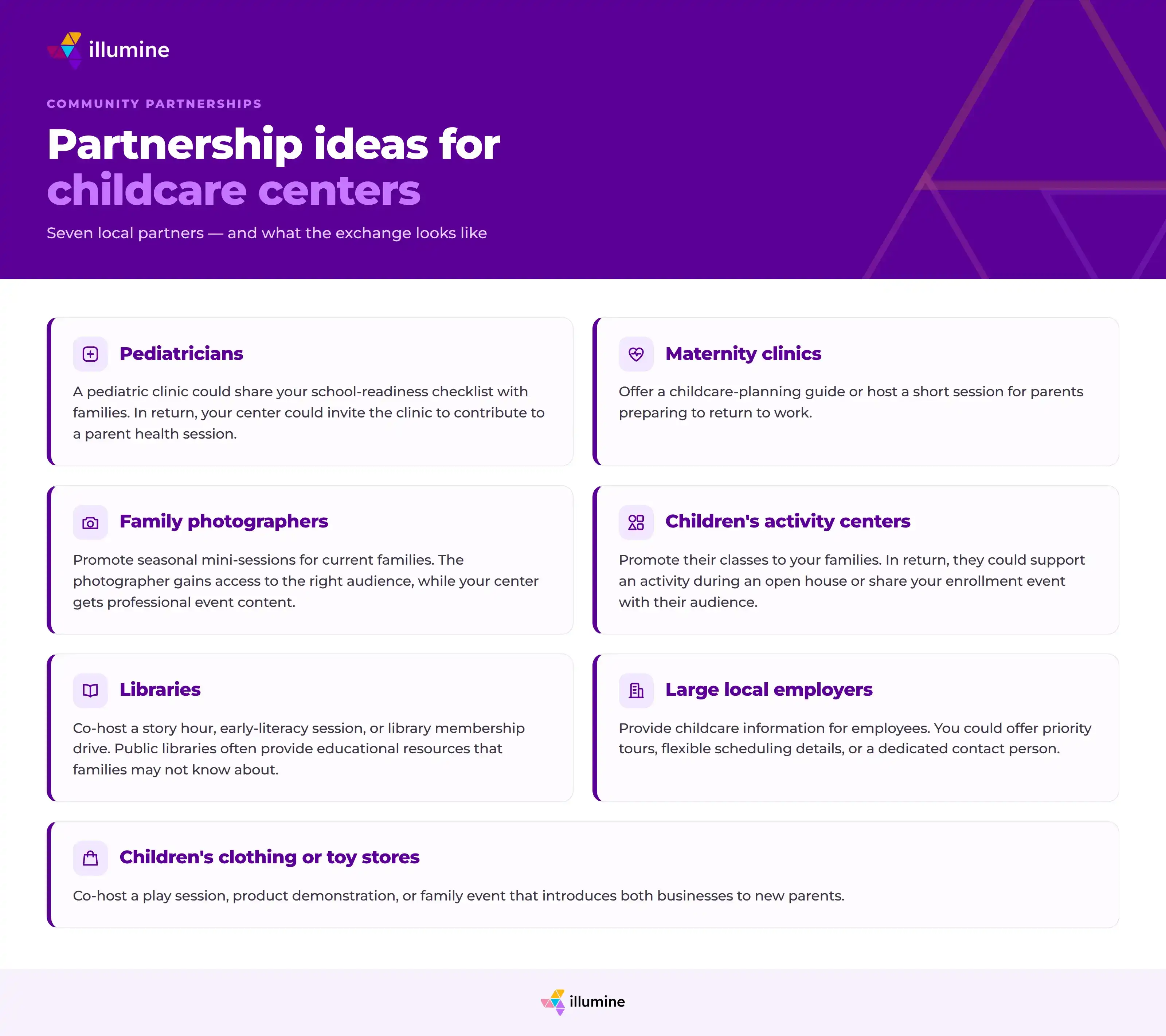
Do not forget to track inquiries from each partner. This will show which relationships are worth maintaining.
What Is Digital Childcare Marketing?
Digital marketing includes the online channels families use to find, evaluate, and contact your center.
A parent may first see your name in a neighborhood group. They may then check your Google listing, read your reviews, visit your website, and browse your social media before submitting an inquiry.
Your digital presence must support that journey.
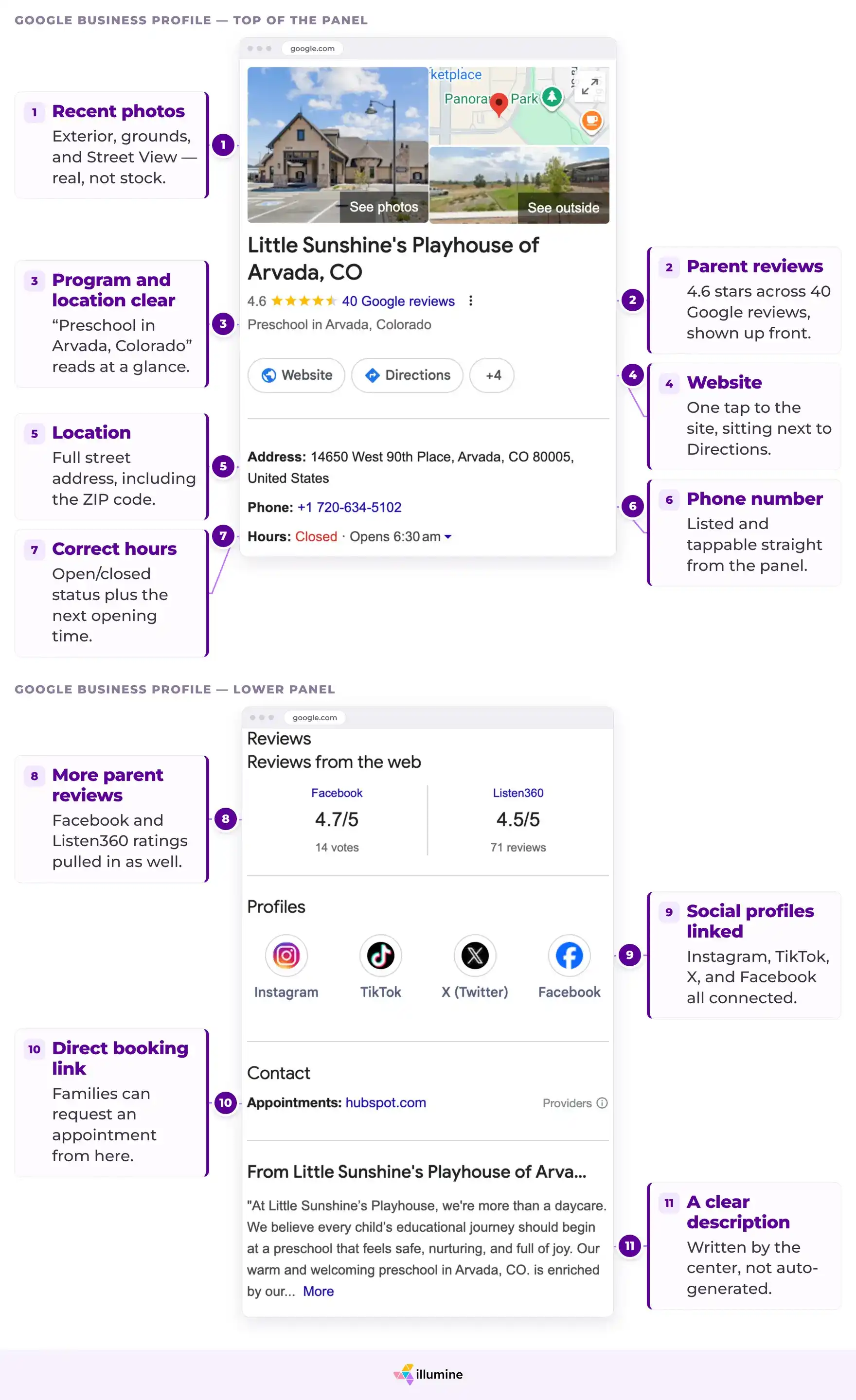
- Optimize Your Google Business Profile
For local childcare searches, your Google profile may appear before your website.
Make sure it includes all relevant information and add new photos regularly. Show classrooms, outdoor areas, learning spaces, and real activities. Avoid relying only on stock images or empty rooms.
Respond to reviews, including negative ones. A calm and helpful reply shows future families how your center handles concerns.
- List Your Center in Relevant Directories
Add your center to local and childcare-specific directories that families in your area use.
Keep the details consistent. Different phone numbers, old addresses, or outdated hours can reduce trust and create confusion.
Track directory inquiries separately so you know which listings generate results.
- Treat Your Website as More Than an Online Brochure
Your website has only a few seconds to help a parent decide whether to keep reading.
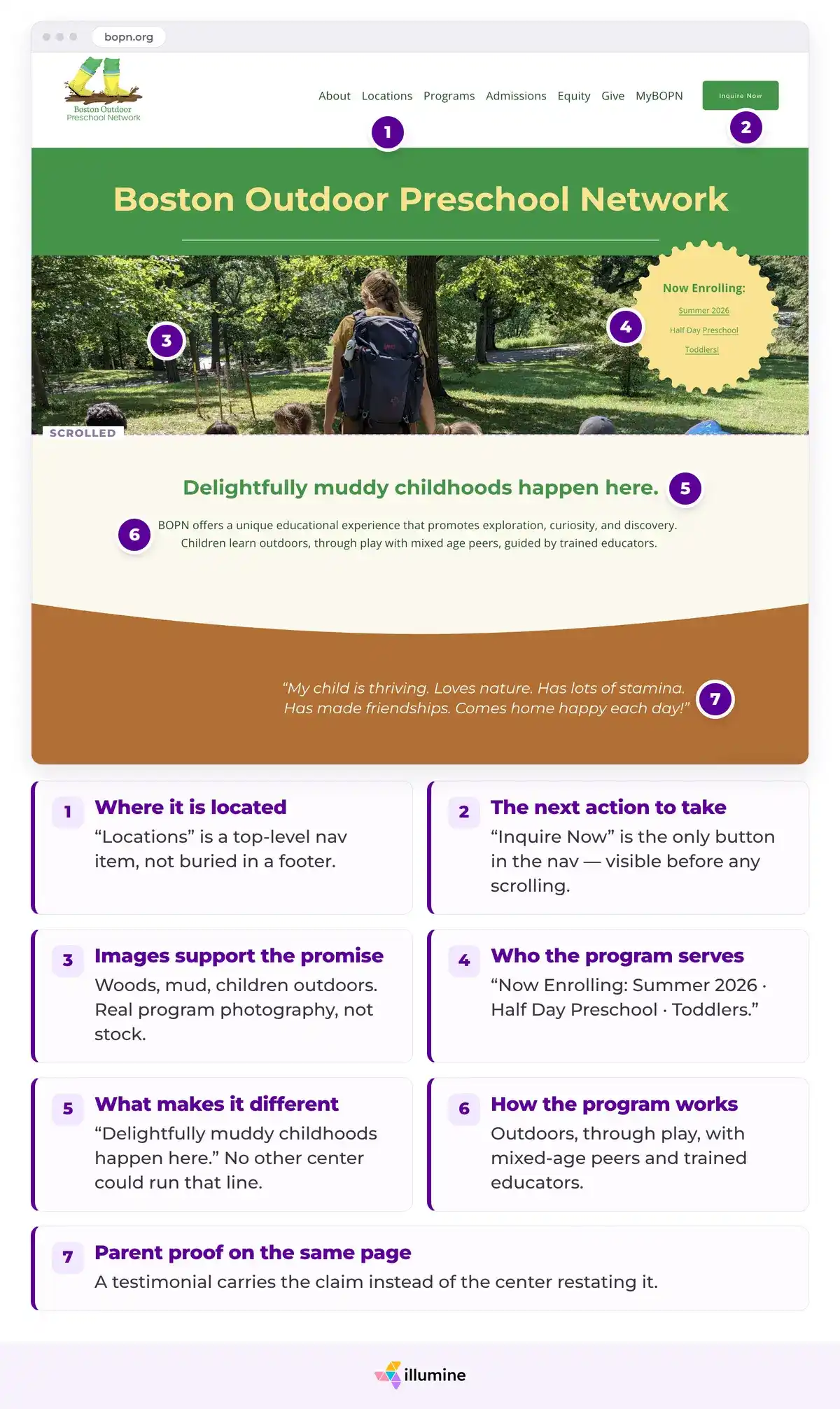
The first screen should clearly show:
- who the program serves;
- what makes it different;
- where it is located;
- the next action to take.
A weak first screen might say:
A nurturing environment where every child can thrive.
The sentence sounds positive, but almost any center could use it.
A stronger version could say:
Nature-based preschool with daily outdoor learning for children ages 2 to 5 in Austin.
This gives the parent a specific reason to continue.
There's a good chance that they're going to come up with five (preschools) that they'll actually click on. And they should not look similar. Each one of them should have a very distinct style.

The images should support the promise. If you promote outdoor learning, show the garden, outdoor classroom, or children taking part in nature activities. Your main call to action should also be clear. Use one direct next step, such as:
- Book a tour
- Check availability
- Join the waitlist
- Request information
Boston Outdoor Preschool Network makes its differentiator clear from the first screen. Its headline, "Delightfully muddy childhoods happen here," is followed by a direct explanation of its outdoor, play-based model. Real program images and parent testimonials support the claim, while visible inquiry and tour links make the next step clear. Parents do not have to search through the website to understand what the school offers or why it is different.
- Use Parent Groups and Forums to Understand Your Market
Online parent groups are the digital version of conversations at the playground.
They show what local families ask, what frustrates them, which centers they recommend, and what they consider when choosing care.
Useful places may include:
- neighborhood Facebook groups;
- local parenting groups;
- city or suburb forums;
- working-parent communities;
- new-parent groups;
- local Reddit communities;
- parent groups linked to apartment complexes or employers.
The first goal is to listen, not promote.
Look for repeated questions such as:
- Which centers offer early drop-off?
- How long are local waitlists?
- Which programs handle food allergies well?
- Where can I find part-time care?
- Which centers provide useful daily updates?
- How do centers support children who struggle with separation?
These questions can guide your program, website copy, social content, and events.
When you contribute, be useful. Answer a question, share a checklist, or explain a process. Do not paste the same promotional message into every discussion.
A center that consistently helps parents becomes familiar before it becomes an option.
- Use Social Media to Show What Families Cannot See
Social media should help parents understand what happens inside your center.
Many providers use it only to post vacancies or run ads. This makes the page feel like a noticeboard instead of a window into the program.
Useful content could include:
Behind-the-Scenes Classroom Moments
Show how educators prepare an activity, set up a learning area, or guide children through part of the day.
Protect children's privacy and follow your consent policy.
Short Tours
Create short videos of classrooms, outdoor spaces, meal areas, or arrival routines.
A full tour is not always necessary. One 30-second video about the art corner can still help a parent picture their child there.
Your Teaching Philosophy in Practice
Do not only say that your center follows child-led learning. Show what that looks like during an activity.
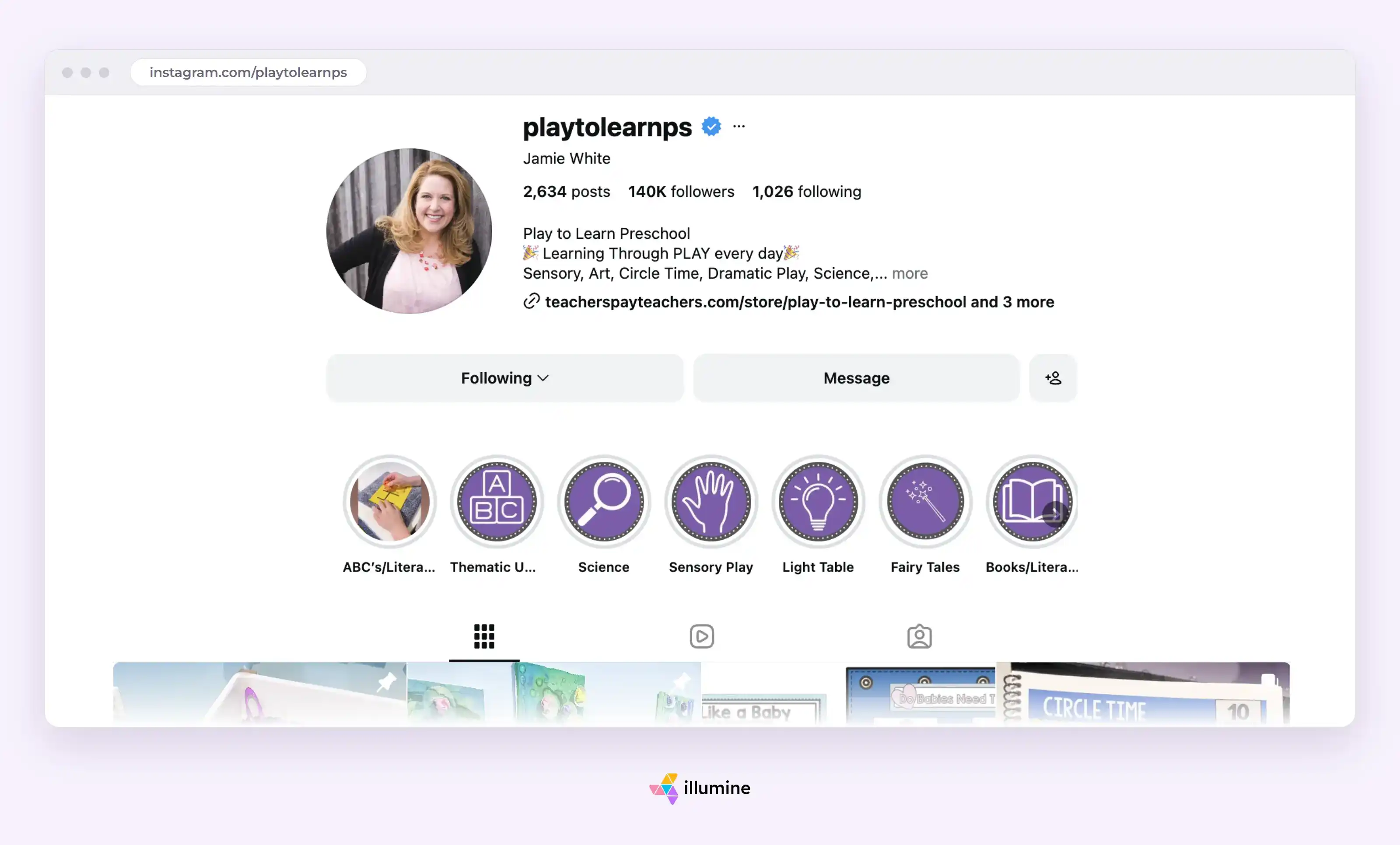
Play to Learn Preschool, a small private preschool in Northern Virginia. Its founder and lead teacher, Jamie White, runs the program in Northern Virginia and shares content from the classroom across YouTube, Facebook, its website, and other social channels. Their posts include classroom tours and seasonal room setups, dramatic-play areas and learning centers, sensory-table activities and so much more.
Children's Work and Learning
Share artwork, projects, classroom displays, or parts of a learning activity. Add a short explanation of what the children practiced.
The explanation gives the post more value than a photo alone.
Progress and Everyday Wins
You can highlight a classroom success without turning the child into an advertisement.
Examples include:
- a group completing a garden project;
- children presenting during show and tell;
- a class learning to serve its own snacks;
- older children helping welcome a new student.
These posts show development, independence, and community.
- Paid Ads
Paid advertising can feel overwhelming, especially when no one on the team has a marketing background.
Start small. Pick one audience, one offer, and one next step.
For example:
- Audience: Parents within five miles who have children ages 1 to 4.
- Offer: Book a weekday tour.
- Landing page: A page about your toddler and preschool programs.
- Goal: Completed tour requests.
Do not send every ad to the homepage. Send the parent to a page that matches the message they clicked.
A preschool-readiness ad should lead to the preschool program page. An infant-care ad should lead to information about infant care.
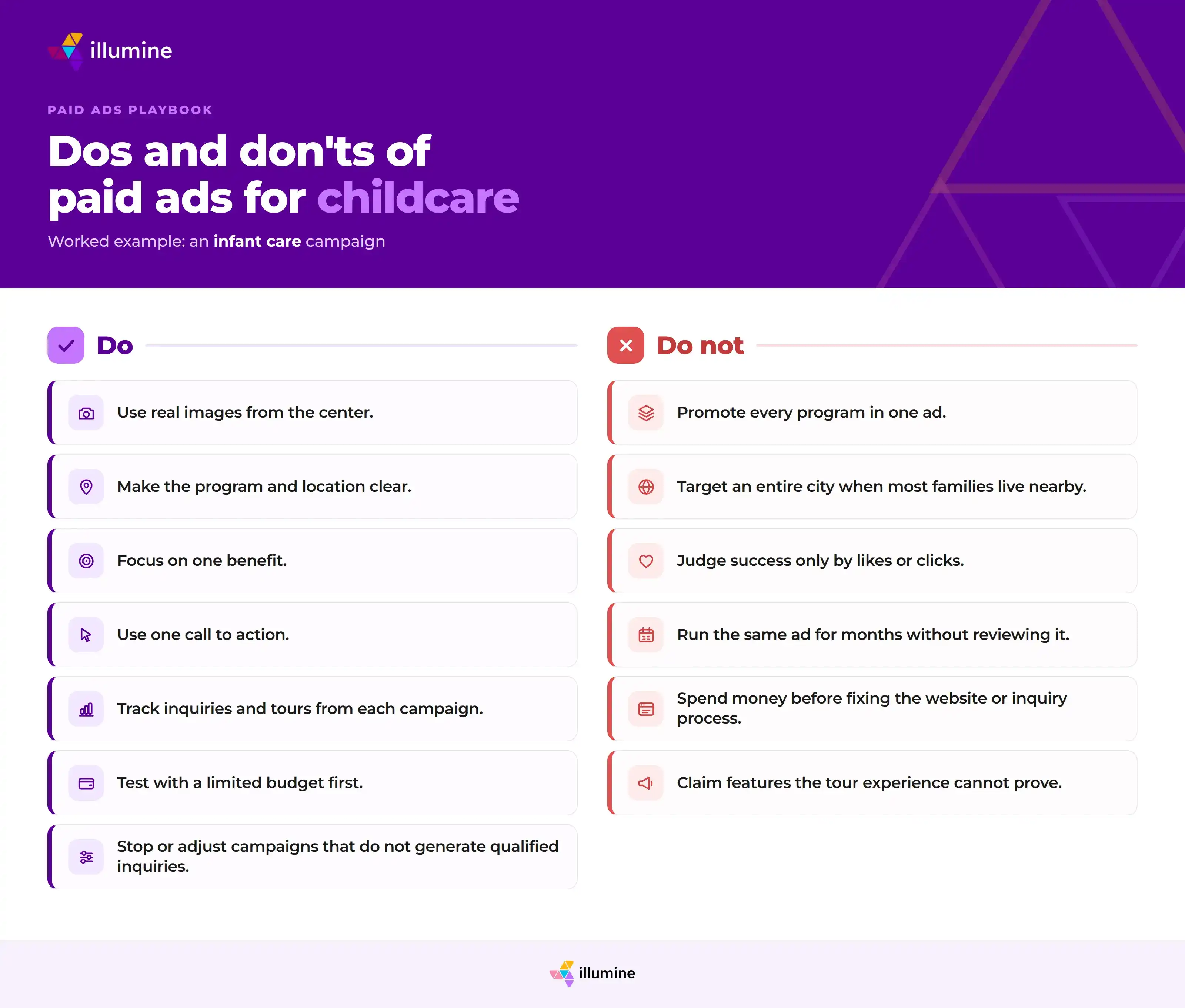
Paid ads amplify what already exists. They will not fix weak positioning, poor reviews, or slow follow-up.
- Review Collection Process
Parents use reviews to reduce the risk of making the wrong childcare decision.
A first-time parent buying baby food may check the ingredients and compare other parents' experiences. Choosing a center involves much more trust. It makes sense that families look for the same reassurance.
Do not leave review collection to chance.
Create a process that identifies moments when parents are likely to feel satisfied, such as:
- after a child reaches a milestone;
- after a successful settling-in period;
- when a parent praises a teacher;
- after a positive progress meeting;
- following a well-run family event;
- during enrollment renewal.
The request should be simple:
We are glad to hear that Maya has settled in so well. Would you be comfortable sharing your experience in a short Google review?
Include the direct review link. Do not make the parent search for your listing.
Teachers can help identify positive moments, but the admin team or software can handle the request. This prevents extra work from falling on educators.
Automated workflows help keep this process running. However, the trigger must still come from a genuine positive experience. Sending review requests at random can feel impersonal.
How Do Offline and Digital Marketing Work Together?
Offline and digital marketing should support each other.
A parent may discover your center through a friend, then check your reviews online. They may see an Instagram video, attend an open house, and later return to your website to book a tour.
Each step should reinforce the same program value.
A referral program works better when the website supports the recommendation. An enrollment event works better when the center can follow up with registrants. Social content works better when the tour delivers the same experience shown online.
Childcare marketing snowballs because each activity strengthens the next one.
A useful event creates new contacts. Those contacts may become tours. Enrolled families may leave reviews. Those reviews improve search visibility and trust. That trust can make future campaigns easier and less expensive.
That is why childcare marketing is not a cost you switch on when a classroom empties. It is an investment in the community that may fill your center next month, next season, and next year.
How Can Childcare Software Make Marketing Easier to Manage?
Childcare marketing can feel overwhelming when it is not your primary area of expertise.
Even low-cost tactics take time. Someone must plan the event, create the content, collect inquiries, follow up with families, track results, and make sure no lead gets lost. That work often falls on directors, administrators, or teachers who already have full schedules.
The problem becomes harder when each task sits in a different tool. One platform may hold website inquiries. Another may manage email campaigns. Event registrations may sit in a spreadsheet. Referral credits may depend on someone updating the billing system by hand.
An all-in-one childcare management platform can reduce that load by connecting marketing, enrollment, communication, and billing in one place.
- Plan Enrollment Events Without Starting From Scratch
Teacher-led events can be effective because they allow families to experience the program before they enroll. However, planning each session can take hours.
AI-generated lesson plans can help teachers build the structure of an event. They can suggest:
- the theme;
- learning goals;
- required materials;
- step-by-step activities;
- age-based adaptations;
- questions for children;
- notes for parents.
This saves planning time while keeping the activity connected to the center's curriculum.
- Create Newsletters Without Moving Between Tools
Newsletters can support event promotion, parent education, referral campaigns, and ongoing community building. But creating them often means designing in one tool, exporting the file, and sending it through another.
A built-in newsletter tool keeps the process in one place. Teams can create the layout, add updates, include event details, and send the campaign without moving between design and email platforms.
This also makes it easier to reuse content. A classroom update could become part of a monthly newsletter. An enrollment event could be promoted to current families, past inquiries, or waitlisted parents.
- Track Every Inquiry in One Place
Parents may find your center through website forms, Facebook or Instagram ads, enrollment events, referrals, and other channels.
When each source is tracked separately, it becomes difficult to know which activities lead to tours or enrollments.
A centralized lead system brings these inquiries into one view. Staff can see where each family came from, what stage they are in, and what action should happen next.
This also makes source tracking more useful. An event should not be judged only by attendance. A partnership should not be judged only by how many flyers were distributed. The real question is how many inquiries, tours, and enrollments each source created.
- Automate Follow-Ups Across the Enrollment Journey
Follow-up becomes difficult when it depends on someone remembering to send the next email.
A workflow can trigger communication based on time or enrollment stage. For example:
- send an acknowledgment after an inquiry;
- share a tour-booking link;
- remind the family before the tour;
- send next steps after the visit;
- follow up when an application remains incomplete;
- contact waitlisted families at set intervals.
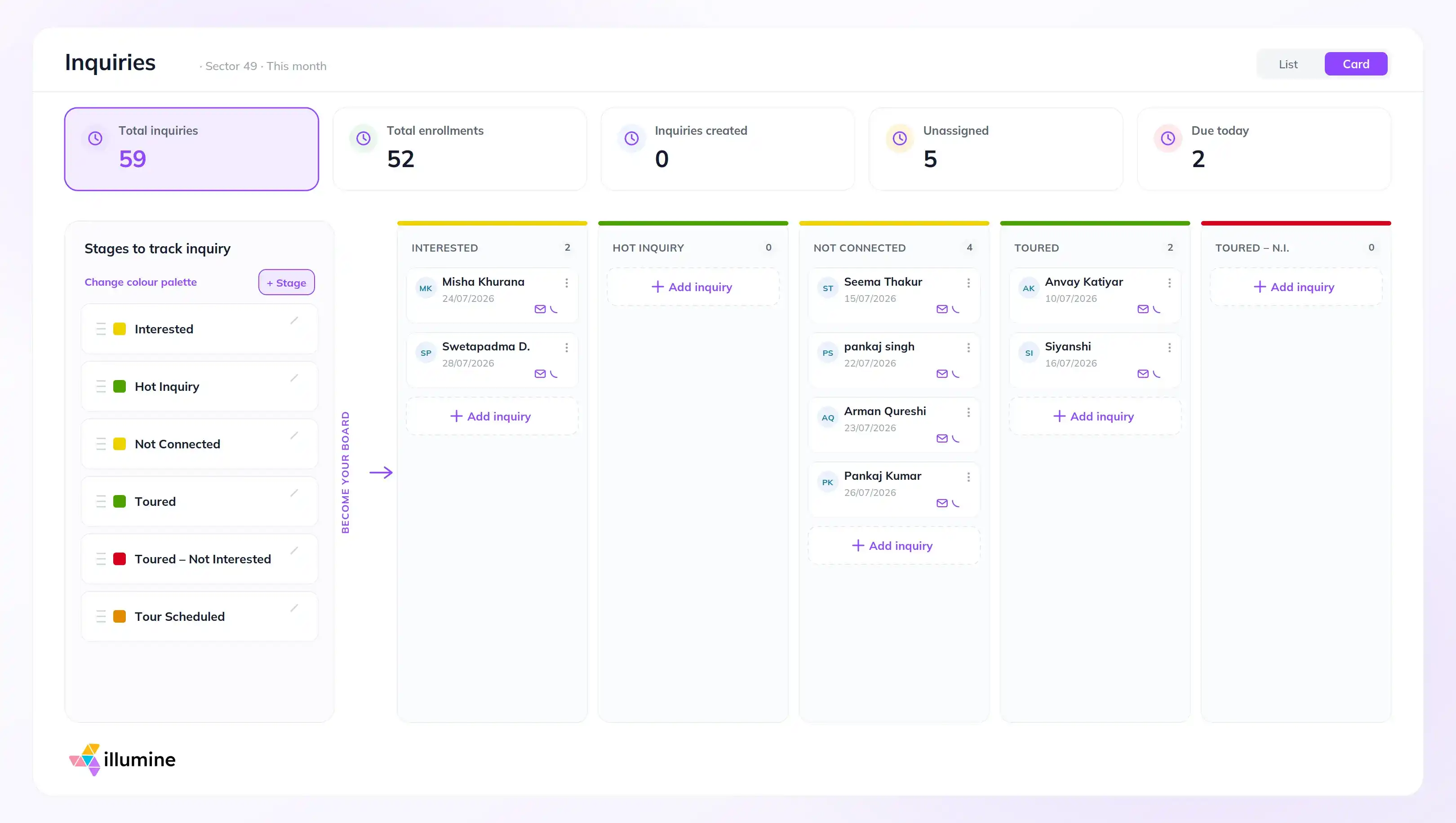
The frequency can be planned in advance. Messages can also change when a family moves from one stage to another.
This keeps the process consistent without asking staff to manage every step manually.
- See Which Marketing Channels Lead to Enrollment
Marketing data becomes useful when it connects activity to results.
Charts and visual reports can show:
- inquiries by source;
- tours generated by each channel;
- conversion percentages;
- enrollments by campaign;
- performance over time;
- results by location.
For multi-center groups, leaders can view the organization as a whole and then examine each center separately. This matters because the same campaign may perform differently across locations.
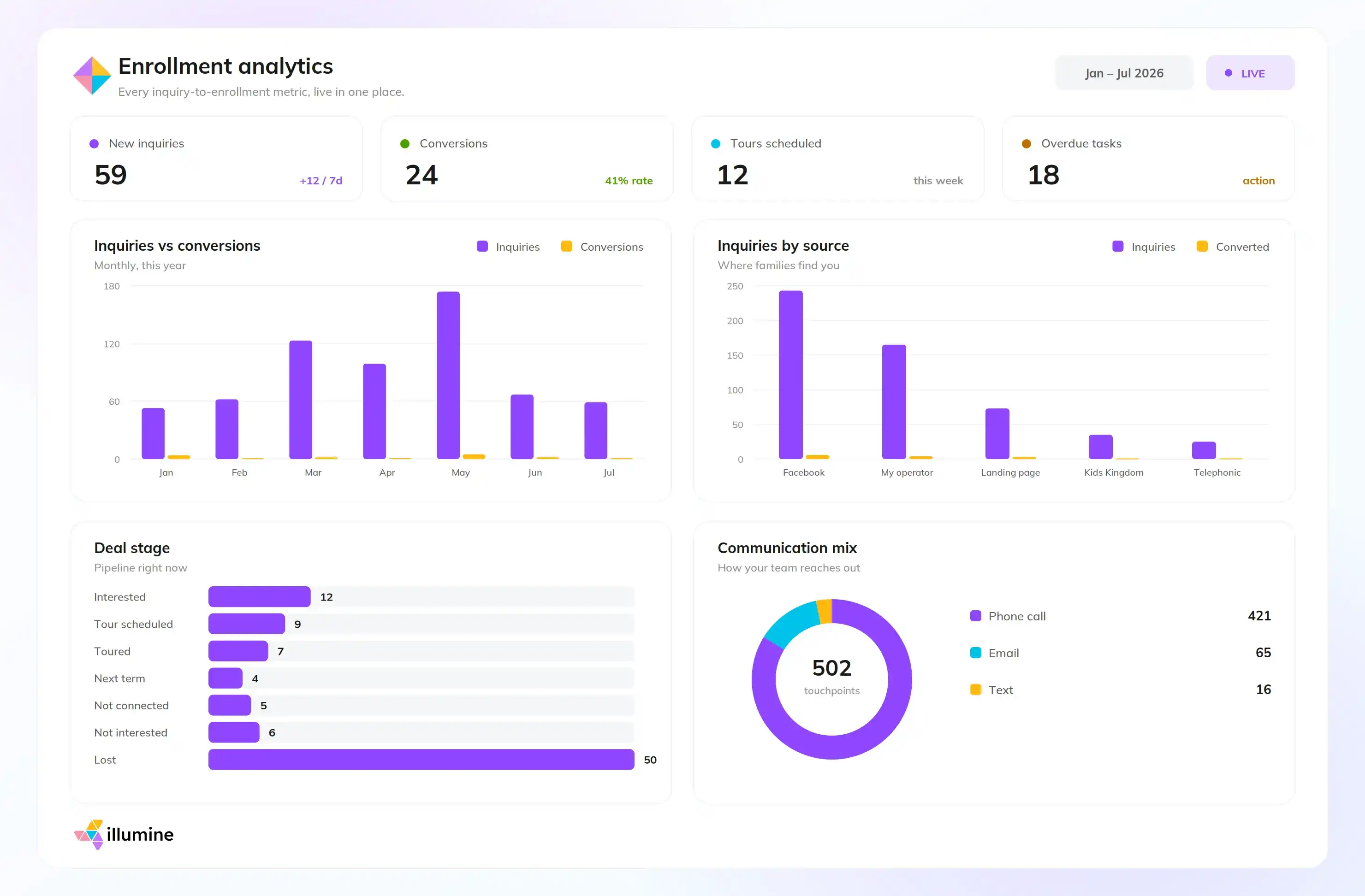
One center may receive strong results from Google. Another may depend more on referrals or local partnerships. Individual reporting helps leaders adjust the plan instead of applying the same budget and message everywhere.
- Build Reviews and Referrals Into the Process
Review and referral requests work best when they follow a positive experience. However, these moments are easy to miss when the process is informal.
A childcare platform can help teams send review links or referral emails when the time is right. This could follow:
- a successful settling-in period;
- positive parent feedback;
- a progress meeting;
- re-enrollment;
- a well-received family event.
Referral incentives can also connect directly to billing. For example, the center could create a tuition credit for a referring family and apply it once the required conditions are met.
This avoids manual calculations and helps the team apply the same rules to every family.

What Does This Look Like in Practice?
illumine brings these parts of childcare marketing into the same system. Centers can use it to plan teacher-led activities, create newsletters, capture leads from different sources, automate enrollment follow-ups, compare channel performance, and manage referral credits through billing.
The goal is not to replace the relationships behind childcare marketing. It is to remove the manual work that makes those relationships difficult to maintain.
Your team still decides what to say, when to reach out, and how to serve families. The software helps make sure the process continues even during busy weeks.