.webp)


Transparent Classroom vs. illumine: Which Fits Your Montessori School?
Record keeping in a Montessori school never feels like one job. It's lesson plans and observations and progress tracking and photos and parent updates, all at once, all while you're trying to actually follow the child in front of you. The right software should quiet that noise. The wrong one just moves it to a screen.
Transparent Classroom and illumine both promise to help, and both are good at what they do. But they're built to solve differently sized problems. Transparent Classroom is the record-keeping tool Montessori guides love: deep, Montessori-native, and backed by a support team that knows the method. illumine is an all-in-one platform that runs the record-keeping and everything around it: admissions, billing, communication, staff, across one or many centers, with AI doing the busywork.
So the real question isn't which one tracks a lesson better. Both do that well. It's how much of your school you want one system to handle, and whether you want AI helping your teachers or staying out of the way entirely.
The short version
Transparent Classroom is the stronger choice if your top priority is the deepest, most Montessori-native record-keeping, you value a support team trained in the method, and you're comfortable running admissions, billing, and marketing in separate tools.
illumine is the stronger choice if you want record-keeping plus admissions, tuition, communication, and staff management in one native system, if you want AI that drafts the tedious parts while your teachers stay in control, and especially if you're running or growing into more than one center.
Put simply, Transparent Classroom perfects the classroom record. illumine runs the whole school. Both can track a child beautifully. They diverge on everything that happens outside the classroom, and on whether AI has a role inside it.
Transparent Classroom vs. illumine: a task-by-task comparison
Native Feature
Partial / Limited
Add-on Requires Partner/Add-on
Not Available/Listed
| illumineAll-in-One Platform | Transparent Classroom |
Onespot(Partner) | |
|---|---|---|---|
| Classroom & Academics | |||
| Montessori Record Keeping | – | ||
| Lesson Planning & Curriculum 1 | – | ||
| Progress Reports for Parents | – | ||
| Concentration & Work-Curve Tracking 2 | – | ||
| AI Lesson Plan Drafting | |||
| AI Observation & Report Writing | |||
| Administration & Operations | |||
| Admissions CRM (Leads) | |||
| Tour Scheduling | |||
| Digital Enrollment Forms & Contracts 3 | – | ||
| Tuition Billing & Payments | Via Partner | ||
| Subsidy / Agency Billing (CCDF) 4 | |||
| Attendance (QR + Kiosk Check-in) | – | ||
| Staff Scheduling & Timesheets | |||
| Payroll | |||
| Multi-Center Dashboards (single login) | – | ||
| Family Engagement & Marketing | |||
| Parent Communication App 5 | – | ||
| Two-Way Messaging & Voice Notes | Via Partner | ||
| Photo / Video Sharing | – | ||
| In-the-Moment Photo Tagging 6 | – | ||
| AI Writing Assistant & Translate | |||
| Marketing Campaigns & Ads | |||
1. Transparent Classroom ships AMI and AMS lesson sets; illumine generates plans from your chosen framework and inputs, which you then edit.
2. Work-curve and concentration analytics are specific to Transparent Classroom; illumine does not replicate them.
3. Transparent Classroom collects basic child and family records; contracts and signed enrollment agreements are handled outside the platform.
4. Subsidy and agency billing in illumine covers CCDF and equivalent programmes; verify coverage for your state or region.
5. Transparent Classroom's companion app is view-oriented: news and photos, without in-app messaging or attendance.
6. Photos captured on mobile in Transparent Classroom are tagged later on the web, not at the moment of capture.
Where Transparent Classroom shines
Give Transparent Classroom full credit because it earns it. Created in 2012 by Montessori educators and now used by more than 2,820 schools worldwide, it was built by people who understand the method, and it shows in the details that matter to a guide.
Its record-keeping is genuinely Montessori-native. Progress lives in a visual grid where you can see patterns of learning and spot gaps at a glance. It tracks concentration and work curves, the kind of developmental signal a generic childcare app doesn't even have a field for. Lesson planning comes with AMI and AMS lesson sets built in, organized the way Montessorians actually think, and everything maps to state standards when you need to talk to accreditors. The daily workflow is fast by design, built around getting observations in without pulling you out of the classroom.
Two more things deserve real praise. Its support is a genuine differentiator: a team trained in Montessori, free live trainings, and a reputation for responsiveness that shows up again and again in how schools talk about it. And its pricing is fair. You pay only for children actively enrolled, with nothing owed when you're closed for the summer, and your data stays yours.
If your single most important criterion is Montessori record-keeping depth backed by people who know the method, Transparent Classroom is hard to beat. The rest of this comparison is about everything that lives outside of that.
Where a records-first tool starts to strain
The limits of Transparent Classroom aren't about quality. They're about scope. It is, at its core, a record-keeping tool with a parent portal, and a school is a great deal more than that.
It doesn't run admissions, billing, or marketing. There's no built-in CRM to chase inquiries, no tuition engine to invoice families, no campaign tools to fill seats. Schools fill those gaps by stacking other products on top: a separate communication app, a separate payments tool, a spreadsheet for the enrollment pipeline. Transparent Classroom only becomes a "whole-school" system through a separate partnership (Onespot) that bundles those pieces in. That's a real answer, but it's a bundle of products stitched together rather than one platform, and every seam is a place where data gets re-entered and handed between tools.
The mobile app is a window, not a workspace. Parents consistently report that the app is limited to viewing news and photos, without the notifications, attendance, or records they'd expect in-app, to the point that some say they'd rather just bookmark the mobile website. For a school selling families on a modern experience, an app that mostly displays a photo feed is a weak first impression.
Photo tagging happens later, at a computer. You can snap photos on a phone during the day, but tagging them to the right child and lesson happens afterward on the web, and untagged photos pile up until someone sits down to sort them. The capture is quick; the filing is homework.
There's no AI. Transparent Classroom is deliberately non-AI, which means documentation is still entirely manual: every observation, every report, every parent update typed out by hand. In a moment when AI can take the typing off a guide's plate without taking over their judgment, "no AI at all" is a widening gap, not a neutral choice.
None of this makes Transparent Classroom a poor tool. It makes it a tool with a defined edge: it documents the classroom beautifully and stops there.
How illumine covers the rest of the school
illumine starts from the whole operation. It was built as one platform to run a school end to end, then made Montessori-friendly, the opposite path from a records tool that grows outward.
It's one native system, not a bundle. Records, admissions, CRM, tuition, parent communication, and staff management live in the same platform, on the same data model, behind one login. A lead captured from your website or Facebook becomes an enrolled child whose billing, attendance, classroom observations, and parent messages all update in the same place. There's no hand-off between products because there's only one product.
Its AI assists teachers instead of replacing them. A guide can snap a photo, leave a voice note, or jot a single line, and illumine turns it into a polished observation or daily report in the school's voice, while the teacher keeps the final say on every word. Lesson plans generate from your inputs and framework as a starting point you shape, not a fixed library you inherit. Parent updates draft themselves from your notes and translate into 20-plus languages with one tap. The tedious part is handled; the meaning stays human.
The app is the product, not a viewer. Teachers and parents work in real time (two-way messaging, voice notes, in-the-moment capture) rather than checking a read-only feed. What a guide records during the day is filed as they go, not queued for later.
It's built to scale across centers. One login covers the whole organization, and center-level and organization-level dashboards let you monitor every location at once, comparing enrollment, occupancy, revenue, and marketing ROI side by side without logging out of one account and into another. Transparent Classroom gives each center real depth; illumine gives a growing group of centers a single, shared view.
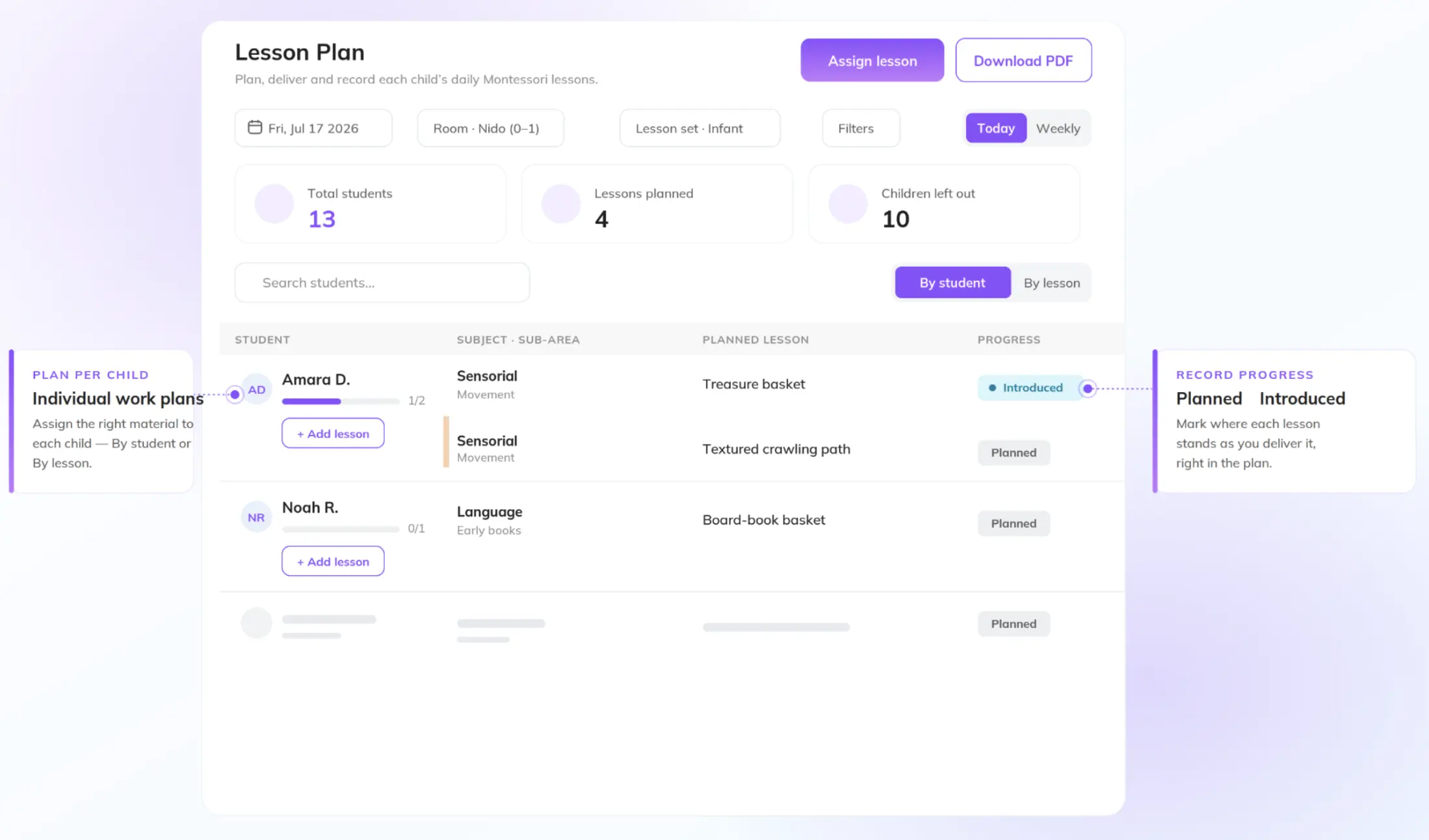
illumine now supports Montessori curricula natively. A school picks its framework at setup, either AMS, AMI, or Montessori Foundation, then plans lessons by child or by lesson, tracks each child's progress and status, and exports to PDF. What it doesn't replicate is Transparent Classroom's work-curve and concentration analytics, the developmental depth guides prize. What it adds is Montessori record keeping connected to everything else that runs your school. Today it's used by more than 3,000 childcare and Montessori programs across 50 countries.
| Job | Transparent Classroom | illumine | Edge |
|---|---|---|---|
| Montessori record keeping | Visual progress grid, work curves, concentration tracking | Flexible records across 50+ frameworks or your own | Transparent Classroom (Montessori depth) |
| Lesson planning | AMI/AMS lesson sets, plan per child or group | AI drafts a plan from your inputs; you refine it | Depends: preset sets vs. AI draft |
| Observations & reports | Manual entry; "10 minutes a day" workflow | Turns a photo, voice note, or line into a report you approve | illumine (faster, AI-assisted) |
| Parent communication | Parent portal + photo diary; companion app is view-oriented | Two-way app, voice notes, AI-drafted updates, 20+ language translation | illumine (richer, real-time) |
| Admissions & CRM | Not built in | Multi-source lead capture, pipeline, tour booking, lead scoring | illumine (native) |
| Billing & payments | Not built in | Invoicing, ACH, recurring, subsidy/agency billing, tax statements | illumine (native) |
| Staff & operations | Not built in | Payroll, ratios, attendance (QR/kiosk), scheduling | illumine (native) |
| Multi-center | Depth within each classroom/center | Single login, cross-center dashboards, monitor all at once | illumine (built for scale) |
| AI | None | Augments teachers; drafts you refine, you stay in control | illumine (AI aimed at the classroom) |
| Support | Montessori-trained team, free live trainings, fast fixes | Standard onboarding and support | Transparent Classroom (method-trained) |
| Pricing | Per active enrolled child; nothing when closed | Package / center-based, quoted to your setup | Depends: usage-based vs. package |
Best suited for
Transparent Classroom fits a single-center or classroom-first Montessori program that prizes record-keeping depth and method-trained support and is content to run admissions, billing, and marketing in separate tools.
illumine fits a school that wants one connected system instead of a stack of them, AI that assists its teachers rather than replaces their judgment, and, above all, an operator running or growing into multiple centers who needs one view across all of them.
Feature lists blur together; workflows don't. The clearest way to decide is to run one real day through each platform: a teacher documenting a child's morning, an update going home to a family, an inquiry turning into an enrollment. Notice where the software helps and where it hands you homework.
Frequently asked questions
Not on its own. Transparent Classroom is a Montessori record-keeping tool with a parent portal. It doesn't include built-in admissions, billing, or marketing; schools add those through separate tools or its Onespot partnership. illumine includes them natively in one platform.
No. Transparent Classroom is deliberately non-AI, so documentation, reports, and parent updates are entered manually. illumine uses AI to draft observations, reports, and updates from a photo, voice note, or short text, with the teacher approving the final version.
It depends on what you need. If you want only record keeping, Montessori Compass or MRX are close alternatives. If you want an all-in-one platform that adds admissions, billing, staff management, and AI-assisted documentation, illumine is the stronger fit, especially for multi-center schools.
Yes. illumine supports flexible, customizable records across 50-plus curriculum frameworks or your own upload, with AI-assisted observations and reports. It doesn't replicate Transparent Classroom's work-curve depth, but it connects records to the rest of the school.
illumine. It offers a single login across locations and cross-center dashboards so you can monitor enrollment, revenue, and operations for every center at once. Transparent Classroom is oriented around depth within a single center.
Transparent Classroom charges per actively enrolled child, with nothing owed when you're closed. illumine uses package or center-based pricing quoted to your setup. Compare total cost including the separate tools each one does or doesn't let you retire.