

You know the feeling. Something goes wrong, you call the company, and instead of a person you get a recorded voice. Press 1. Press 4. "I'm sorry, I didn't quite get that." Ten minutes later you're jabbing the zero key like it owes you money, just hoping a human picks up. The system worked exactly as designed. It just wasn't designed around you.
That gap, between what a tool automates and what a person actually needs, is the real test of any technology. And it is the most basic yet most overlooked challenge in software today: knowing where to draw the line between speed and the human touch. Automate too little and you drown in busywork. Automate too much, in the wrong places, and you build the software equivalent of that phone tree.
For Montessori schools comparing platforms, this matters more than any feature checklist. Nearly every tool now advertises AI, admissions, billing, and marketing. Montessori Compass, through its Growth Suite, and illumine both do. So the question is no longer whether a platform has these things. It is how it uses them, and whether it leaves a person in charge. That is where Compass and illumine part ways.
The short version
Montessori Compass, with its Growth Suite, is the stronger choice if you want the largest prebuilt Montessori lesson library and a teacher-centric tool, you're happy to have the work done largely for you (automated ad campaigns, a 3,000-lesson library, a year of pre-written content), and you're running a single center.
illumine is the stronger choice if you want AI that gives you a starting point you shape rather than a finished product you inherit, if you'd rather your teachers stay the authors of their own lessons and reports, and especially if you're running, or growing into, more than one center.
Put simply: Compass automates the work and hands you the result. illumine gives your team the tools and keeps them in control. Both can enroll a child and track a lesson. They diverge on everything that happens around those two things.
Montessori Compass vs. illumine: a task-by-task comparison
| Job | Montessori Compass + Growth Suite | illumine | Edge |
|---|---|---|---|
| Montessori curriculum | 3,000+ lesson library, Foundation-built, standards-mapped | AMS, AMI, and Montessori Foundation curricula, selectable at setup | Even; Compass has the larger prebuilt library |
| Lesson planning & progress | Preset library; plan and track per child | Plan by child or by lesson, per-child progress and status, AI-assisted | Even |
| Lesson-completion report | Dedicated completion overview | Per-child and class progress, with PDF export | Compass; dedicated overview |
| Daily activity tracker | Live in-app tracker (naps, activities, lessons) | Sent home as an end-of-day parent report plus PDF | Split; in-app vs. parent-facing |
| Observations & reports | Manual entry; work curves and concentration data | Turns a photo, voice note, or line into a report you approve | illumine; faster, AI-assisted |
| Admissions & CRM | Pipeline, lead scoring, tour scheduling, automated follow-up | Multi-source capture, pipeline, lead scoring, tour booking | Even; illumine native |
| Marketing | Done-for-you: managed AI ads plus 52 weeks of content | Tools and data you run and localize; channel ROI | Depends; hands-off vs. control |
| Billing & payments | Invoicing, ACH, card, recurring, QuickBooks | Same, plus subsidy/agency billing and tax statements | illumine; more depth for US ops |
| Parent communication | Portal and companion app, view-oriented | Two-way app, voice notes, AI-drafted updates, 20+ language translation | illumine; richer, real-time |
| Multi-center | Real depth within a single center | Single login, cross-center dashboards, monitor all at once | illumine; built for scale |
| AI approach | Concentrated in ad optimization | Augments teachers; drafts you refine, you stay in control | illumine; AI aimed at the classroom |
| Pricing | Transparent, ~$4/student/mo (Growth Suite) | Package / center-based, quoted to your setup | Depends; compare the tools each retires |
The sections below explain the calls behind this table: the classroom is now close to a wash, so the real difference is what each platform does around the classroom, and how illumine's "AI as a first draft you control" philosophy plays out across lessons, documentation, and parent communication.
Where Montessori Compass is strong, and where "done for you" starts to cost you
Give Compass real credit. It was built by Montessorians, and the classroom tooling shows it. Its lesson library runs more than 3,000 lessons, built with the Montessori Foundation and mapped to standards, and it is larger than what illumine ships out of the box. Two reporting touches are genuinely nice: a dedicated overview of how many lessons each child has completed, and a live in-app tracker that shows the day's naps, activities, and lessons at a glance.
Those are real edges, so name them plainly. But they are narrow, and on the rest of the classroom the gap has closed. illumine now lets a school pick its Montessori curriculum at account setup, either AMS, AMI, or Montessori Foundation, then plan lessons by child or by lesson and track each child's progress and status. The same daily activities Compass surfaces in its in-app tracker, illumine captures and sends home to parents as an end-of-day report and a downloadable PDF. So the classroom is no longer where these two platforms meaningfully differ. What is left is everything around it, and that is where the design philosophies split.
The Growth Suite's philosophy is to automate the whole thing and hand it over. That sounds like a gift until you are the one who has to live with the output.
Take the marketing. The Growth Suite advertises fully automated, done-for-you ad campaigns. But marketing is local in a way automation struggles with. A school in a competitive suburban market serving bilingual working parents is not running the same playbook as a small rural program with a waitlist built on word of mouth. Every area, price point, and family profile is different. When the campaign isn't yours to begin with, you end up reverse-engineering someone else's automation to fit your reality, and reshaping a generic campaign is often more work than building one that was yours from the start.
The same tension shows up in the preset lesson library. A 3,000-lesson catalog sounds like a shortcut, but teachers who work with large presets report the same friction: lessons overlap across areas, the same material sitting under both Sensorial and Math, so you record it twice unless you hunt down the duplicates and archive them; and the preset titles often don't match a guide's own album, so they rewrite big chunks before the system fits how they teach. One elementary guide replaced the entire preloaded curriculum with a 1,200-line list of her own. A preset isn't a time-saver if the first thing you do is undo it.
None of this makes Compass a bad tool. It makes it teacher-centric by design: strong in the classroom, thin everywhere else, and reliant on automation to do the thinking in the places automation is weakest, like your marketing voice and your enrollment funnel.
How illumine draws the line: AI as a first draft you control
illumine makes the opposite bet. Its AI is designed to enhance what you do, not replace your judgment. The pattern repeats across the platform: the software does the heavy lifting, then hands you the pen.
Lesson planning. illumine starts from the Montessori curriculum your school actually uses. You pick your framework at setup, either AMS, AMI, or Montessori Foundation, and from there you plan lessons by child or by lesson and track each child's progress and status. When you want a head start, illumine's AI drafts a plan from your inputs, the child, the goal, the developmental area, which you then adjust. You're editing toward your intent, not away from someone else's default.
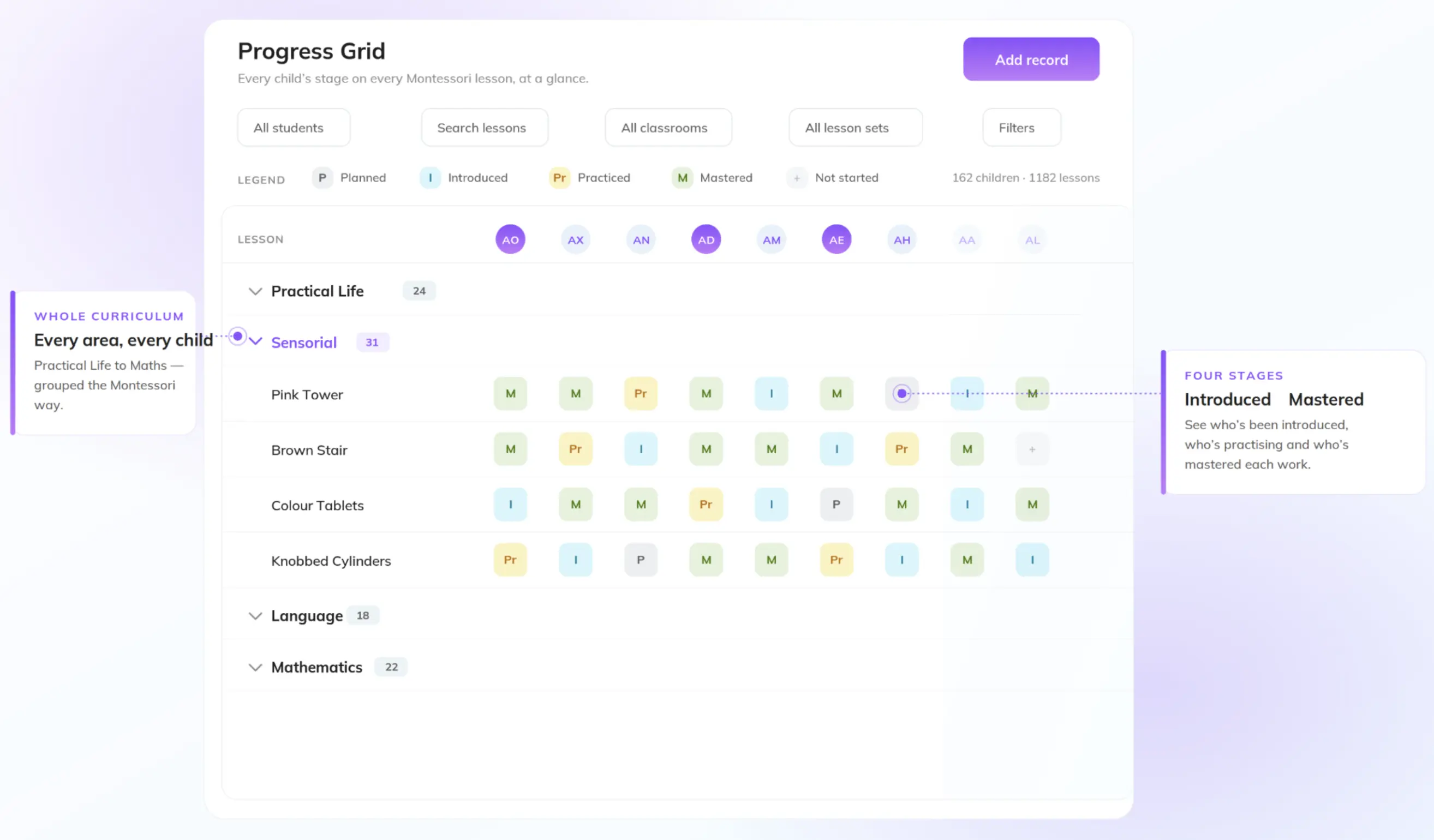
Observation and reports. This is where the philosophy gets concrete. A guide can snap a photo, leave a quick voice note, or jot a single line, and illumine turns it into a polished observation or daily report in the school's voice. Teachers who use it describe the AI expanding their rough notes into clear, professional write-ups, fixing the grammar, tightening the structure, while they keep the final say on what actually goes to families. As illumine puts it, the heavy lifting is handled, but no one knows the children like you do, so you approve every word. That is the difference between AI writing for you and AI writing with you.
Parent communication. The teacher-facing experience is built around keeping updates fast and personal at the same time. Activities log to a time-stamped timeline of the child's day that a teacher can update in seconds from a phone. AI turns those quick entries into warm, readable updates, and one tap translates them into 20-plus languages so every family reads them in their own. The teacher is the author. The software just takes away the part nobody became an educator to do: the typing.
The through-line is trust in the human. illumine's AI accelerates the tedious parts of documentation and communication while leaving the meaning in human hands.
| Job | Montessori Compass + Growth Suite | illumine | Edge |
|---|---|---|---|
| Montessori curriculum | 3,000+ lessons, Foundation-built, standards-mapped | 50+ frameworks or upload your own | Compass — deepest library |
| Lesson planning | A preset library you adapt and prune | AI drafts a plan from your inputs; you refine it | Depends — a library to edit down vs. a draft to build up |
| Observations & reports | Manual entry: work curves and concentration data | Turns a photo, voice note, or line into a polished report you approve | illumine — faster, keeps you the author |
| Admissions & CRM | Pipeline, lead scoring, tour scheduling, automated follow-up | Multi-source capture, pipeline, lead scoring, tour booking | Even — both capable; illumine native |
| Marketing | Done-for-you: managed AI ads + 52 weeks of content | Tools and data you run and localize; channel ROI | Depends — hands-off vs. control |
| Billing & payments | Invoicing, ACH, card, recurring, QuickBooks | Same, plus subsidy/agency billing and tax statements | illumine — more depth for US ops |
| Parent communication | Portal and companion app, view-oriented | Two-way app, voice notes, AI-drafted updates, 20+ language translations | illumine — richer, real-time |
| Multi-center | Real depth within a single center | Single login, cross-center dashboards, monitor all at once | illumine — built for scale |
| AI approach | Concentrated in ad optimization | Augments teachers; drafts you refine, you stay in control | illumine — AI aimed at the classroom |
| Pricing | Transparent, ~$4/student/mo (Growth Suite) | Package / center-based, quoted to your setup | Depends — compare the tools each one retires |
Parent communication. The teacher-facing experience is built around keeping updates fast and personal at the same time. Activities log to a time-stamped timeline of the child's day, meals, naps, milestones, moments, that a teacher can update in seconds from a phone. AI turns those quick entries into warm, readable updates, and one tap translates them into 20-plus languages so every family reads them in their own. The teacher stays the author. The software just takes away the part nobody became an educator to do: the typing.
The through-line is trust in the human. illumine's AI accelerates the tedious parts of documentation and communication while leaving the meaning, the thing only a teacher who knows the child can supply, in human hands.
The second dividing line: one center vs. many
There's a point where even the best single-school tool stops being enough, and it has nothing to do with features. It's the day you run more than one center.
For a single school, the two are close enough on classroom tools that the choice comes down to fit. That is not where the real difference lives.
The math changes the moment you're overseeing two locations, or three, or ten. Now the daily problem isn't depth in any one center, it's visibility across all of them. Which site is behind on enrollment this month? Where are ratios tight? Which location's marketing is actually converting? If answering those questions means logging out of one account and into another, one center at a time, you've traded your growth into a chore.
This is where illumine is built to scale. One login covers the whole organization. Center-level and organization-level dashboards let you monitor every location at once, side by side, without switching accounts. Enrollment, occupancy, and revenue roll up by site so you can compare them at a glance. Marketing performance and ROI break out by location. Standards, pricing rules, and permissions can be set once and applied consistently everywhere. You watch the entire operation from a single screen instead of stitching a picture together from separate logins.
So the honest way to frame it: Compass is built around a single center. illumine gives a growing group of centers a single, shared view. If your plan is to run one school, either can document it. If your plan is to grow, the question right behind "does it run one school well?" is "can I see all my schools in one place?", and that's the question illumine is built to answer.
Best Suited For
Montessori Compass fits a single-center, teacher-centric program that wants a large prebuilt Montessori library plus a couple of reporting touches like a lesson-completion overview and an in-app daily tracker. Just note that admissions, marketing, and billing arrive only with the paid Growth Suite add-on, and even then as a separate tier bolted onto the core.
illumine fits a school that wants its Montessori classroom tools, admissions, billing, and parent communication in one native system, AI that assists its teachers rather than replaces their judgment, and, above all, an operator running or growing into multiple centers who needs one view across all of them instead of a separate login for each. illumine is used by more than 3,000 childcare and Montessori programs across 50 countries.
See it on your own centers
Feature lists blur together. Workflows don't. The fastest way to feel the difference is to run one real day through each platform: a teacher documenting a child's morning, an update going home to a family, a dashboard showing you every center at once, and notice where the software is helping you and where it's handing you homework.
Frequently asked questions
illumine uses AI as augmentation. It drafts lesson plans from your inputs, turns quick notes, photos, and voice memos into polished observations and reports, and helps write parent updates — but you review and approve everything. The goal is to speed up the tedious parts while keeping educators in control of the content.
Its depth suits a single center well. For multi-center operators who need cross-center dashboards, side-by-side reporting, and a single login across locations, illumine is built specifically for that kind of visibility.
It depends on what you want. Compass offers a large preset Montessori library of 3,000-plus lessons to adapt and prune. illumine generates a plan tailored to each child that you refine and builds reports from your own notes. One gives you a library to edit down; the other gives you a draft to build up.
With illumine, yes. The teacher writes the note or captures the moment; AI expands it into a clear update in the school's voice, and translation makes it readable for every family. The educator is the author.
They can, but not always. Because markets, localities, and family profiles differ so much, a generic campaign usually needs reshaping to fit your school — and editing someone else's automation can take as long as building a campaign that was yours from the start.