


What Does Childcare Management Software Do to Keep Up in 2026?
Most childcare management software sold today is still solving a 2005 problem.
It takes what used to live on paper and moves it onto a screen.
But digitizing a broken workflow doesn't fix it; it archives it. And while the early childhood sector has spent the last two decades accumulating tools that do exactly this, the actual problems facing childcare centers have outpaced them entirely. Today, 41% of childcare programs are operating below capacity despite stable demand in most markets. Turnover among early childhood educators is among the highest of any sector in the US. Subsidy revenue goes uncollected, not because centers don't earn it, but because the software isn't built to catch the discrepancies. And professional development keeps getting pushed to after-hours because no one has built it into the workday.
Legacy platforms were built for a different era, with a different set of assumptions about what technology should do. Today, parent expectations have changed, franchise and multicenter childcares are on the rise, the competition with government-funded programs is increasing, and AI is taking over all industries. Yet, childcare management software hasn’t evolved to fit this reality. Hence, the gap between what those platforms can solve and what running a childcare center in 2026 actually requires has become impossible to close with workarounds.
This piece is about that gap - what it costs you, what it looks like in practice, and what software built for today's problems actually does differently.
What is childcare management software?
The definition starts with the problems the category exists to solve.
Modern childcare centers aren't struggling with one thing. They're managing distinct pressure points simultaneously, and how well a platform addresses each one is what separates genuine management software from a digitized filing cabinet. Let’s dive deeper into the 4 key functions that childcares today struggle with:

1. Enrollment instability
Demand for childcare exists in most markets. While enrollment may feel unsteady or seasonal, the problem isn’t the lack of inquiries but a center’s ability to convert inquiries fast enough. The average family submits inquiries to multiple centers. The one that responds first, follows up consistently, and makes enrollment frictionless wins the spot. Most centers lose families not to a better competitor but to a slower internal process.
2. Staff Burnout and Turnover
Burnout in early childhood education is driven primarily by administrative burden, not classroom work. What makes this particularly costly is what that time displaces. The biggest barrier to professional development in childcare is lack of time. So the same administrative load that burns teachers out is also preventing them from building the skills that make the job meaningful - managing behavioral challenges effectively, implementing evidence-based curriculum approaches, understanding child development well enough to catch early concerns before they become serious ones.
Teachers are leaving because the systems around them treat documentation as their primary job, and leave the actual teaching as whatever's left over.
3. Revenue Leakage
Limited public funding is a structural problem that no software platform can solve. But the gap between what a center is owed and what it actually collects is a different problem - one that software can and should address directly. Subsidy billing requires attendance records, approved hours, program-specific documentation, and reconciliation across multiple claim cycles. When any of those elements fall out of sync, revenue that was legitimately earned becomes a write-off. In a sector with thin margins, that leakage is significant and largely invisible until it compounds.
4. Inconsistent Parent Experience
For most families, the experience of a childcare center is shaped by the people they interact with day to day. And in many centers, that experience varies more than it should.
Different teachers share updates in different ways. Some send detailed observations and photos. Others keep it minimal. Communication depends less on a defined standard and more on individual habits. Over time, this creates uneven visibility for parents into their child’s day.
The gaps become more visible during transitions. The person present at drop-off is not always the one at pick-up. Information shared verbally often does not make it across shifts. What should be a continuous record of the child’s day turns into fragmented updates, with parents piecing together context on their own.
These are four pressure points (out of many) that childcare management software exists to address. Whether it actually does, and how well, is a different question.
What Does Childcare Management Software Do?
The honest answer is: it depends.
Most platforms in this category were developed when the primary goal was to replace paperwork.
And they did that.
Attendance moved from sign-in sheets to digital logs. Invoices moved from printed forms to emailed PDFs. Daily reports moved from handwritten notes to app notifications. Each of those was a genuine improvement over what came before.
But the underlying assumption - that the job of software is to hold information that used to live on paper - never changed. And that assumption is where legacy platforms hit their ceiling.
What legacy platforms actually do:
Take parent communication. Most established platforms have a messaging module. Parents receive updates, teachers can send photos, and announcements go out center-wide. That's real functionality. But the communication sits in a silo. A director who wants to understand whether parent engagement is improving over time, whether certain classrooms are communicating more than others, or whether a specific family's engagement has dropped in the weeks before they unenroll - that data isn't visible.
The same pattern repeats across billing. Legacy platforms can send invoices and record payments. But the invoice is generated from the billing module, the attendance data lives in the attendance module, and the subsidy claim is managed separately from both. If an attendance record changes after a subsidy claim has been submitted, nothing flags the discrepancy automatically. A staff member has to notice, investigate, and correct it manually.
Many don't. The write-off happens quietly.
The structural problem isn't any single feature. It's that legacy platforms were designed around departments: a billing department, a communications department, and an attendance department. But the actual workflows of a childcare center are much different, where all of those things interact with each other constantly.
A director dealing with a family who is behind on payments, disengaged from teacher updates, and whose child has had three unexplained absences this month - that situation is visible in three separate modules, none of which talk to each other. The director has to connect the dots herself.
What a modern childcare management software does differently:
The shift is not about adding more features. It is about starting from a different premise: that the software should reflect how childcare centers actually operate.
Instead of treating communication, billing, attendance, and enrollment as separate functions, modern systems are built to surface the connections between them and reduce the amount of manual effort required to keep them aligned.
There are a few ways this shows up in practice.

1. Data visibility
As operations grow, especially across multiple centers, understanding what is happening in real time becomes harder.
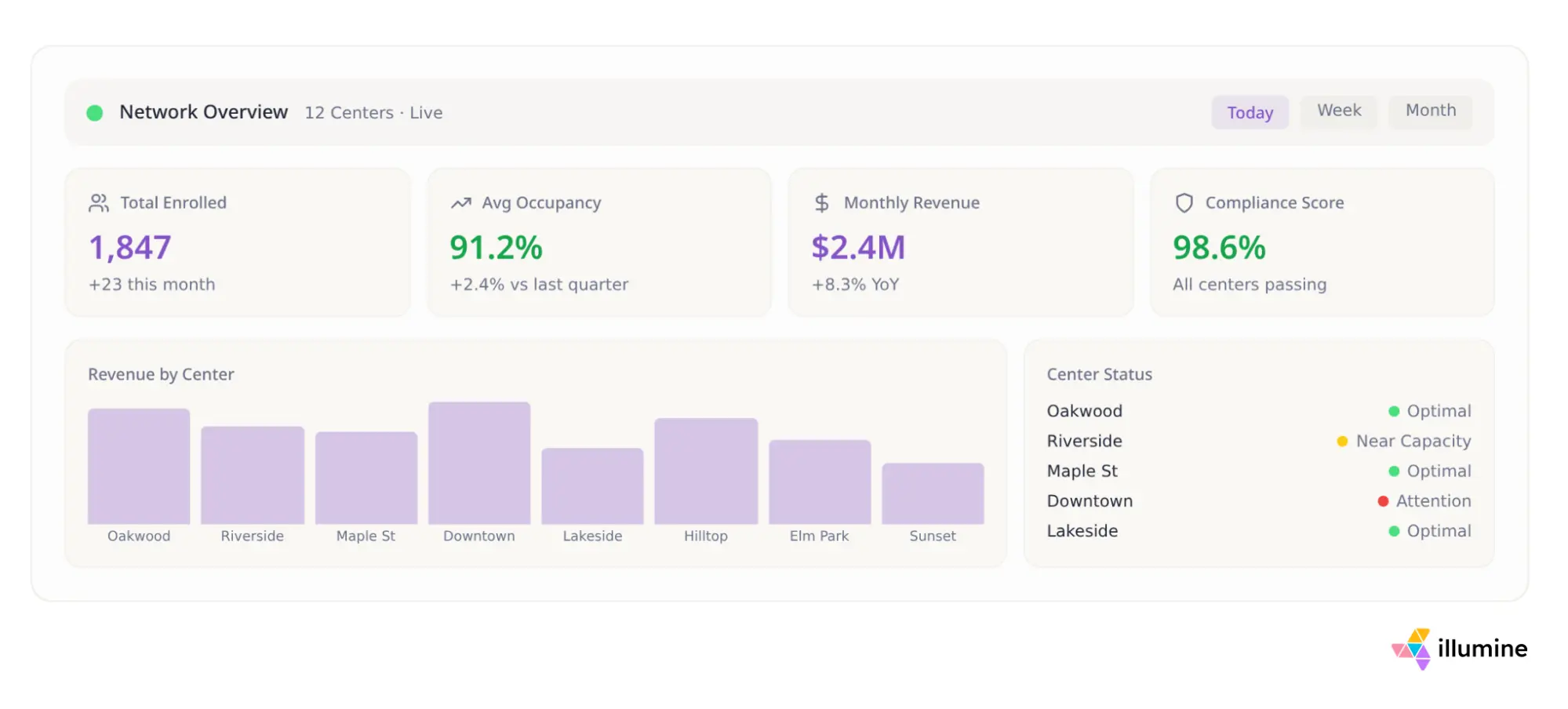
Modern platforms bring key metrics into a single, intuitive view. Enrollment funnels, fee collections, occupancy levels, and compliance risks are not buried across different tabs or spreadsheets. They are visible in one place, in a format that makes it easier to identify patterns early.
This is not just about reporting. It is about reducing the time it takes to understand what is working, what is slipping, and where attention is needed.
2. User friendly AI
Most systems are technically functional, but difficult to use consistently.
Modern platforms place equal emphasis on how the system is used day to day. For teachers, that means being able to log updates, record observations, and complete required documentation without it feeling like a separate administrative task. For parents, it means receiving clear, timely updates in a format that is easy to follow without needing to search for information.
When the interface is clean and intuitive, usage becomes consistent. And consistency is what makes the underlying system effective.
3. AI automation
A large part of administrative workload in childcare comes from repetition. Following up on inquiries, sending reminders, reconciling records, tracking documentation, and preparing reports.
Modern systems use automation to handle these tasks in the background. Not by removing oversight, but by reducing the need for manual intervention at every step.
As these capabilities become more advanced, some providers are beginning to build AI agent solutions that can proactively manage follow-ups, monitor operational workflows, and assist staff with routine administrative tasks.
This creates space for staff to focus on higher-value work, whether that is improving classroom quality, engaging with parents, or investing time in professional development.
4. Interconnected workflows
The most fundamental difference is how different parts of the system interact.
If attendance is tracked, that data should immediately reflect in staff-to-child ratios and compliance checks. If invoices are generated, payments should be collected and reconciled within the same system. If a child’s attendance changes after a subsidy claim, the discrepancy should be visible without requiring someone to manually trace it.
Modern platforms are designed so that actions in one part of the system automatically update related workflows elsewhere. This reduces duplication, minimizes errors, and removes the need to manage multiple tools that do not communicate with each other.
How to Choose Childcare Management Software That Scales With You
Different childcare centers have different needs. A single-center program operating at full capacity will prioritize different things than a multi-center organization managing enrollment, staffing, and compliance across locations.
But one thing remains consistent.
As your center grows, those needs evolve. What feels sufficient today often starts to break as operations become more complex. The challenge is not just choosing software that works for your current setup, but choosing a system that can support how your center will operate six months or a year from now.
Switching systems later is rarely simple. It disrupts workflows, affects staff adoption, and creates gaps in data continuity.
So the question is not just what works today, but what continues to work as complexity increases.
Here are a few things to evaluate carefully. If you want a longer list to work through before you shortlist vendors, this breakdown of the top 10 things to look at in preschool management software covers each criterion in detail.
1. Does it support decision-making across your operations?
As a leader, your time is better spent on improving classroom quality, mentoring your team, and ensuring safety and compliance. Not on pulling together data from multiple sources just to understand what is going wrong.
In many centers, identifying the cause of a cash crunch requires looking at enrollment numbers in one place, fee collections in another, and subsidy payments somewhere else entirely.
Good software reduces that effort.
It should be able to bring together data from enrollment, billing, and attendance, and surface patterns clearly. Whether it is low occupancy, delayed payments, or gaps in subsidy reconciliation, the system should make those signals visible without requiring manual analysis.
When this information is presented through a clean, intuitive dashboard with clear charts and summaries, decision-making becomes faster and more reliable.
2. Is the interface easy for both teachers and parents to use?
Usability is not a secondary concern. It directly affects whether the system works in practice.
For teachers, the day is already demanding. Managing young children while keeping up with documentation is not easy. If the system is slow, difficult to navigate, or limits basic actions like uploading photos or logging updates efficiently, usage will drop.
Over time, that leads to incomplete records and inconsistent communication.
On the parent side, the experience matters just as much. If the interface is difficult to navigate or updates are not easy to access, engagement declines. Even if teachers are sharing detailed information, it does not reach families effectively.
A clean, responsive interface increases adoption on both sides. And consistent usage is what makes the system valuable.
3. Does it reduce your dependence on multiple tools?
Childcare operates on tight margins. Fixed costs like rent, insurance, and salaries already take up a significant portion of revenue.
Adding multiple tools to manage different parts of the operation increases both direct costs and operational overhead.
It is common to see centers using one system for billing, another for accounting, and separate tools or spreadsheets for attendance and reporting. Each additional system adds cost, but more importantly, it fragments workflows and increases the time required to manage them.
An effective platform reduces that fragmentation.
When billing, payments, attendance, and reporting are handled within a single system, reconciliation becomes simpler, errors are easier to catch, and staff spend less time switching between tools.
4. Does it use automation to reduce repetitive work?
A large portion of administrative work in childcare is repetitive. Daily reports, lesson planning, assessments, follow-ups, and documentation all require time and consistency.
This is where software should actively reduce effort, not just record it.
Modern platforms should use AI to support these workflows. Whether it is assisting with lesson planning, generating structured daily reports, or helping teachers document observations more efficiently, the goal is to reduce the time spent on routine tasks.
This does not replace the role of educators. It gives them more time to focus on what matters in the classroom.
The impact of childcare management software often shows up in the background, in how smoothly daily operations run and how quickly leaders can make decisions.
When systems are disconnected, small inefficiencies add up. Hours are spent reconciling data, following up manually, and fixing errors. Over time, that becomes a real operational cost, especially across multiple centers.
When those gaps are addressed, the impact is immediate. Platforms like illumine help centers recover 8 to 10 hours of administrative work each week, while giving multi-center leaders clear visibility into enrollments, collections, and overall performance.
That combination of time savings and visibility directly affects the bottom line.
This is also where the category is evolving. Software is no longer just about managing records. With AI, it can now assist with lesson planning, documentation, and communication, making day-to-day work easier for both staff and leadership.
As childcare operations become more complex, the difference between software that stores information and software that actively supports it becomes critical.